Send Bulk SMS Messages from Salesforce
Sending the same SMS or WhatsApp message to a large group of customers or leads can take time when you have to manage contact lists separately.
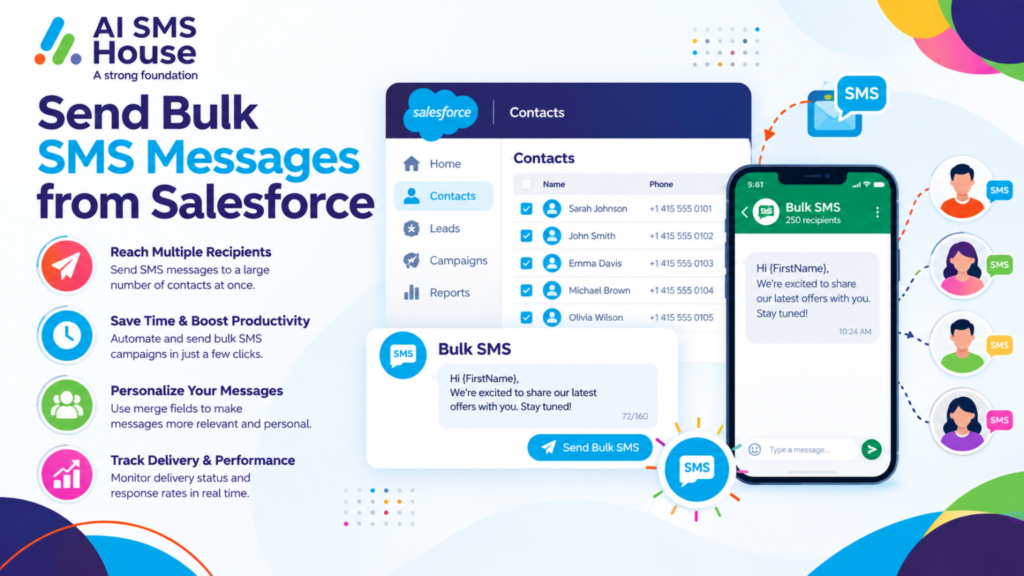
With Salesforce, you can select the people you want to reach, create your message and send bulk SMS messages from Salesforce while keeping the communication connected to your existing records. This is achieved by using a Salesforce-native SMS app, like AI SMS App.
In this article, learn how to send bulk SMS messages from Salesforce, see the use cases, and how to use templates.
How to Send Bulk SMS from Salesforce
You can use a Salesforce SMS messaging solution such as AI SMS App to bring bulk messaging into your existing Salesforce workflow.
Depending on your requirements, you can send messages from List Views, Reports or Campaigns. You can also use templates and merge fields to make your messages more relevant to each recipient.
Bulk SMS can be useful when you need to communicate the same type of update to several customers. You can use it for:
- Appointment reminders
- Service updates
- Payment reminders
- Event notifications
- Delivery updates
- Important customer announcements
- Follow-ups after enquiries
Sending a bulk SMS from Salesforce usually starts with the records you already have in your Salesforce org. You can select the right Leads, Contacts or other records using List Views, Reports or Campaigns.
A typical process looks like this:
- Create or select the Salesforce records you want to contact.
- Check that the records have valid mobile numbers and the required consent.
- Create your SMS or WhatsApp message using a template or write a new message.
- Add merge fields where you want to personalise the message.
- Select the recipients and send the SMS/WhatsApp in bulk.
- Track delivery and message activity against the relevant Salesforce records.
This means you can work from the customer information you already manage rather than creating another contact list.
If you want to explore the Salesforce messaging app, you can view AI SMS House on Salesforce AppExchange.
Send Bulk Text Messages from Salesforce Using List Views
List Views can make it easier to find the right group of people before sending a message. You might create a list for new leads, customers with upcoming appointments or contacts who need a particular update.
Send Bulk Text Messages from Salesforce Using Reports and Campaigns
Reports and Campaigns can also help you organise recipients based on your business requirements. For example, you could create a group of leads from a particular region or customers connected to a specific campaign.
This gives you more control over who receives the message rather than sending the same text to your entire database.
Send Bulk SMS from Salesforce Using Templates
Bulk does not have to mean sending the exact same message to everyone. Templates can save you time when you regularly send similar messages, and you can use Salesforce information to personalise your texts.
You can create standard SMS content and use Salesforce merge fields to add details such as:
- First name
- Company name
- Appointment date
- Adviser or account manager
- Reference number
This gives you a quicker way to send consistent messages while still keeping them personal.
Bulk SMS Use Cases in Salesforce
Different teams can use Salesforce bulk SMS in different ways.
Mortgage and financial services: appointment reminders, document requests and application updates.
Real estate: viewing reminders, property updates and follow-ups.
Education: enrolment reminders, event notifications and student communications.
Healthcare: appointment reminders and important service notifications.
Recruitment: interview reminders and candidate updates.
Retail: order updates, promotions and customer notifications.
Event updates: Keep event attendees informed about changes, timings or important information.
Marketing campaigns: Send promotional messages to customers who have given the required permission.
Education updates: Contact students, parents or applicants about important dates and updates.
Appointment reminders: Remind customers about upcoming appointments or meetings.
Payment reminders: Send payment or invoice reminders to customers.
Event updates: Keep event attendees informed about changes, timings or important information.
Customer notifications: Share service updates, confirmations or other important messages.
Marketing campaigns: Send promotional messages to customers who have given the required permission.
Education updates: Contact students, parents or applicants about important dates and updates.
Property updates: Keep buyers, tenants or property enquiries informed about viewings and updates.
Healthcare reminders: Send appointment or service reminders where appropriate consent and privacy requirements are met.
SMS Consent and Opt-Outs
Before sending bulk texts, you need to make sure your messaging process follows the applicable consent requirements. Salesforce provides consent settings and opt-out handling for its messaging channels, including support for opt-out keywords such as STOP.
Your process should therefore include checking communication preferences before a bulk send and respecting any opt-out request.
Why Use Salesforce for Bulk SMS?
When your customer data and SMS activity sit within Salesforce, your team has one place to manage the communication process. You can select the right audience, personalise messages and keep communication connected to the relevant Salesforce records.
You can also use Salesforce automation to support regular messaging workflows. Application House provides Salesforce-focused solutions and can help your business make better use of automation.
If you want to send bulk SMS messages from Salesforce, using your existing Salesforce data can give your team a more connected way to manage customer communication.